Forecasting Using Formula
Forecasting in the Budget Performance window allows you to produce either a Cost Estimate or use a predefined method of determining the Estimated Cost to Complete for each Cost Code in a project.
The different forecasting calculation methods available can be found under the Forecasting section of either the Edit menu or the Context menu in the Budget Performance – Detail tab.
The formula to be used in a predictive forecast is selected from the context menu on the Detail tab of the Budget Performance window, the Edit menu or from the toolbar.
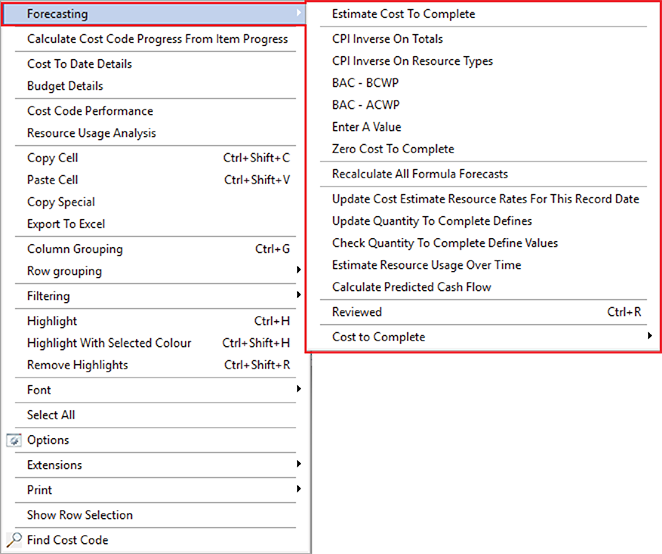
Budget Performance – Forecasting context menu
There are six available forecasting methods in the Budget Performance window.
FORECASTING FORMULAE
|
METHOD |
DESCRIPTION |
|---|---|
|
Cost/Performance Index inverse on totals |
This method factors the Budget to Complete based on the Actual Cost of Work Performed and the Budgeted Cost of Work Performed. Estimate To Complete = Actual Cost of Work Performed / Budgeted Cost of Work Performed * Budget to Complete Cost Codes using this Forecasting Method will be highlighted Green. |
|
Cost/Performance Index inverse on resource type |
Similar to CPI inverse on totals except that individual Resource Types are predicted and the Estimate to Complete is the sum of the predictions for Labour, Material, Plant and Subcontract. Cost Codes using this Forecasting Method will be highlighted Blue. |
|
Budget at Completion – Budgeted Cost of Work Performed |
This method calculates the Estimate to Complete using only the budget figures. Estimate To Complete = Budget at Completion – Budgeted Cost of Work Performed Cost Codes using this Forecasting Method will be highlighted Black. |
|
Budget At Completion – Actual Cost Of Work Performed |
This method calculates the Estimate to Complete using both the Budget at Completion and the Actual Cost of Work Performed values. Estimate To Complete = Budget at Completion – Actual Cost Of Work Performed Cost Codes using this Forecasting Method will be highlighted Khaki. |
|
Estimate To Complete |
This method allows you to perform a first principles Estimate to Complete using the Cost Estimate window. Cost Codes using this Forecasting Method will be highlighted Red. |
|
Enter a value |
While not strictly a formula, this method allows you to enter a number as the Estimated Cost to Complete. Cost Codes using this Forecasting Method will be highlighted Orange. |
|
Zero cost to complete |
Removes Cost to Complete values for when there is no longer any Estimated Cost to Complete for the Cost Code. Cost Codes using this Forecasting Method will be highlighted Grey. |
Each true formula prediction calculation is based on the data available, mainly Actual Cost Of Work Performed, Budgeted Cost of Work Performed and Budget At Completion.
Any inaccuracies in these values will cause inaccuracies in the prediction. It should also be noted that predictions must assume linear progress through the works in the Cost Code. This means that any Cost Code that is not linear or contains multiple facets may cause the formula to give unrealistic results.