Spread Groups – Ribbon Toolbar
Genesis edition only.
The contextual ribbon toolbar for the Spread Groups window provides you with access to all of the functions that allow you to add, remove and modify the Spread Groups within your project.
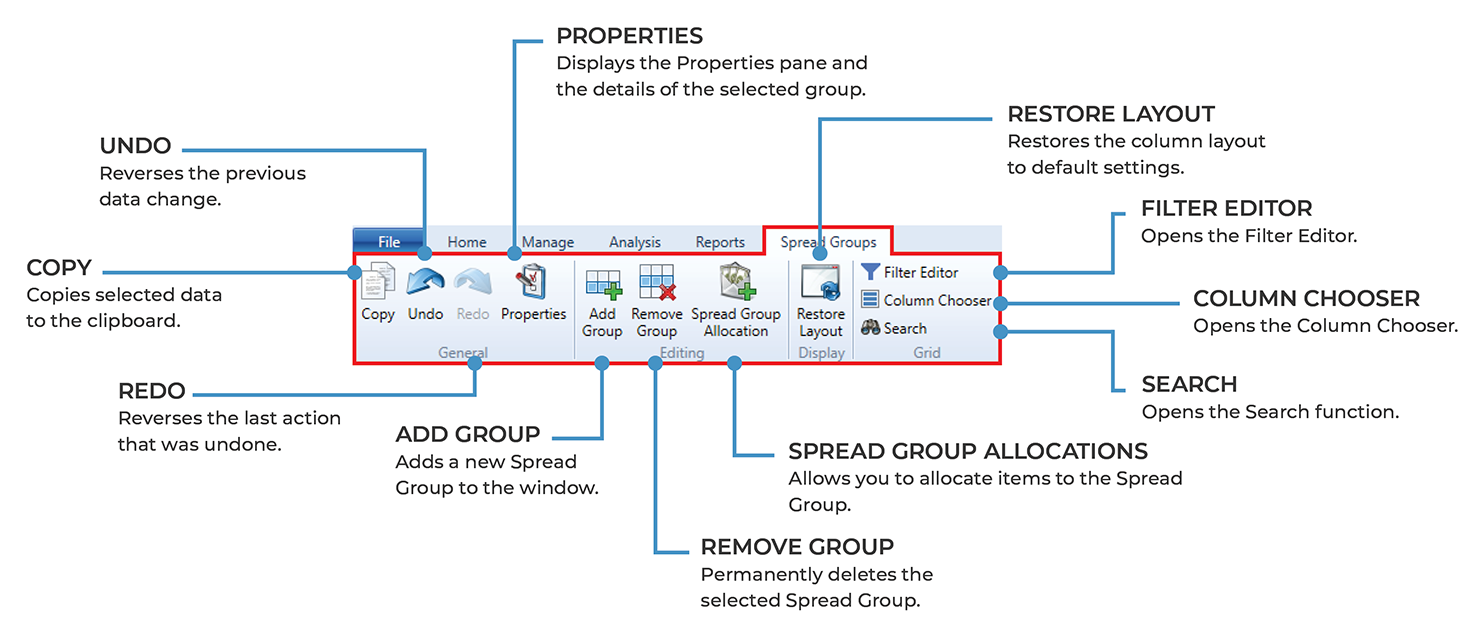
Spread Groups – ribbon toolbar
GENERAL GROUP
|
NAME |
DESCRIPTION |
|---|---|
|
Copy |
Clicking the Copy button will copy the selected Spread Group information to the clipboard. This allows the data to be pasted within Expert Estimation or into an external application. |
|
Undo |
Clicking the Undo button reverses the last change made to the data. |
|
Redo |
The Redo button becomes available when an undo action is performed and is used to reverse the undo action. |
|
Properties |
Opens the Properties pane on the right-hand side of the window. This will display the details of the currently selected Spread Group(s) and give you the ability to edit multiple groups at once. |
EDITING GROUP
|
NAME |
DESCRIPTION |
|---|---|
|
Add Group |
Clicking the Add Group button will add a new Spread Group to the project with the default name Spread Group. |
|
Remove Group |
Clicking the Remove Group button will permanently remove the selected Spread Group from the Spread Groups window. |
|
Spread Group Allocation |
Opens the Spread Group Allocations window, allowing you to assign Direct Cost Schedule items to a Spread Group. |
DISPLAY GROUP
|
NAME |
DESCRIPTION |
|---|---|
|
Restore Layout |
If columns have been removed, adjusted or relocated, clicking the Restore Layout button will restore columns to their default layout. |
GRID GROUP
|
NAME |
DESCRIPTION |
|---|---|
|
Filter Editor |
Opens the Filter Editor to allow users to modify the contents of the grid so that only items that match the specific criteria set will be displayed. |
|
Column Chooser |
Clicking the Column Chooser button will open a dialogue box that will allow users to add or remove columns from the grid. |
|
Search |
Clicking the Search function will display a field in the top right-hand corner of the grid, that will allow users to search the current window for the text entered. |