Carbon Emission Module
Genesis edition only.
The Carbon Emissions module allows users to document, analyse, and report on their project’s environmental impact by creating various profiles to be assigned to a base resource.
This module can be accessed by clicking the Carbon Emission Profiles button from the Resource Explorer ribbon toolbar.
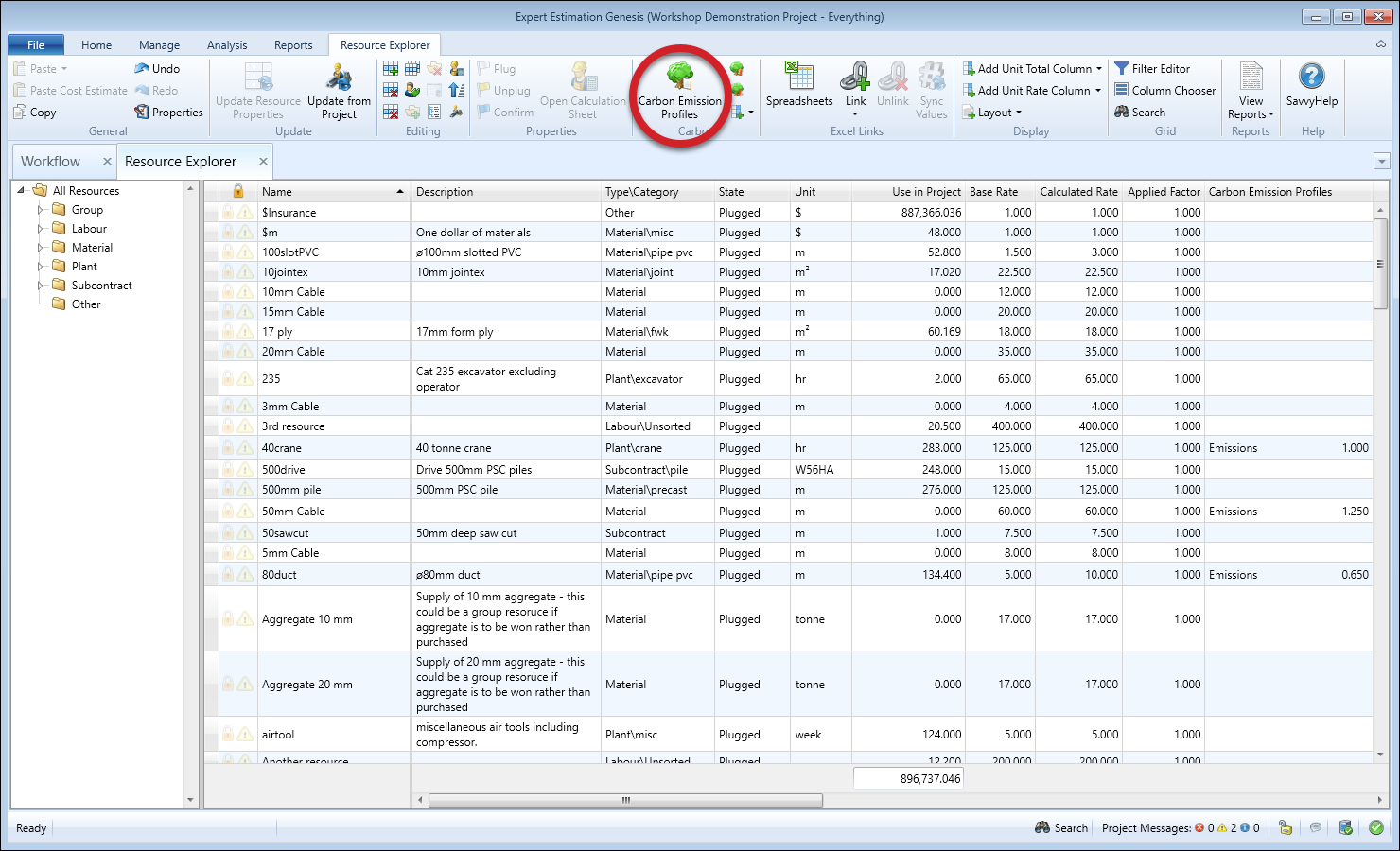
Resource Explorer - Carbon Emission Profiles icon
From the Carbon Emission Profiles window users can define a set of Carbon Emission Factors. Carbon Emission Factors can be accessed via the Carbon Emission Factors button on the Carbon Emission Profiles ribbon toolbar. Factors can be grouped for easier organisation.

Carbon Emission Profiles - Carbon Emission Factors icon
Once Factors have been defined, every Profile will automatically have a column for each Factor. This permits users to enter the relevant Factor values as desired to each individual Profile. Not every column needs to be filled for every profile, so you can keep each profile focused and relevant.
Once Profiles are created, they can be assigned to Base Resources via the Carbon Emission Profile column in the Resource Explorer. Using the Add Carbon Factor Column function, columns can be added to the Resource Explorer grid to display individual Factors, group totals or Carbon Total.
The system calculates totals for each Factor per Base Resource by adding the factors from each assigned profile then multiplies by Use in Project, calculating total emissions per resource and per factor.
Because the Factors themselves are user-defined, the level of detail can be as broad or as fine-grained as required. The module is also database-agnostic, so emission factor data can be sourced from any provider.
CARBON FACTOR TOTALS
The formula below shows how the Carbon Factor Totals are calculated when Carbon Emission Profiles are used within the project.
Carbon Factor Total = Use in Project * (Sum of that Factor Value for each profile assigned to that Base Resource x the Carbon Profile Multiplier).
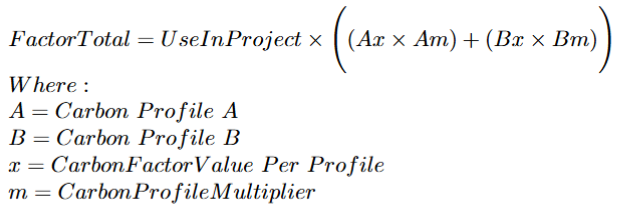
For example, with two carbon profiles applied to a base resource with 3 different factor values and a multiplier for each profile, the formulas become:
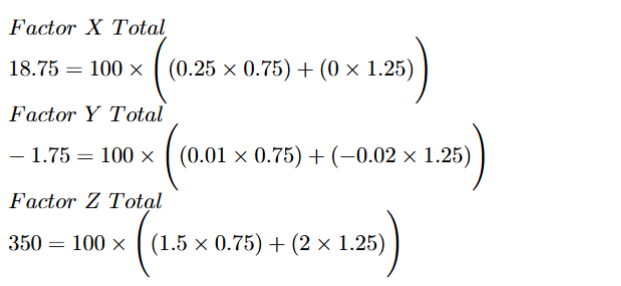
This is using the values listed below.
- Base Resource = Use in Project = 100 with two Carbon Profiles assigned
- Profile A = Factor X = 0.25, Factor Y = 0.01 , Factor Z = 1.5
- Profile B = Factor X = 0, Factor Y = -0.02 , Factor Z = 2
- Profile A Multiplier = 0.75
- Profile B Multiplier = 1.25
- Factor X Total = 18.75
- Factor Y Total = -1.75
- Factor Z Total = 350
Columns for the Factor Totals and Carbon Total are available throughout the application and in reports such as the Submission Schedule and the Spread Results window.