Carbon Emission Profiles
Genesis edition only.
Carbon Emission Profiles are the source of emissions data for a project. Each Profile contains a column for every defined Carbon Emission Factor, and these columns are populated with the quantity of emissions generated for that Profile.
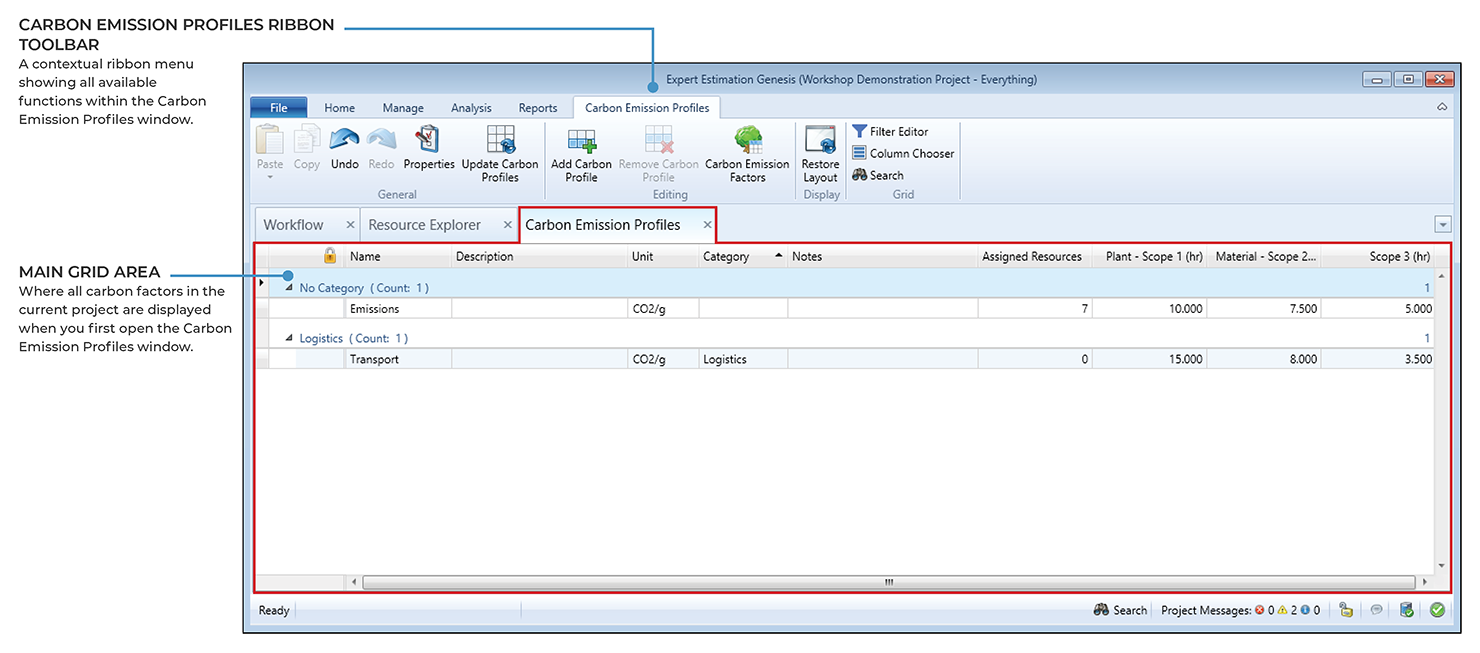
Carbon Emission Profiles window.
Profiles are designed to be reusable;
- A single Profile can be assigned to multiple Base Resources.
- Multiple Profiles can be assigned to a single Base Resource.
This makes Profiles flexible and suitable for a wide range of use cases.
The Carbon Emission Profile window allows for the creation of Profiles which can record a variable number of Carbon Emission Factors that will be applied to the Base Resources in the project.
Profiles are created and managed within the Carbon Emission Profiles window, with each Profile requiring a unique name within the project. An unlimited number of Carbon Emission Profiles can be created, with each profile containing the ability to reference any number of Carbon Emission Factors for defining and tracking different types of emissions.
Once Carbon Emission Factors have been defined, their columns appear automatically on the right-hand side of the Profiles grid. These fields allow users to enter the emission value per factor against each Profile.
Carbon Profiles are assigned to Base Resources. The total emissions for a Resource are then calculated using the Base Resource’s Use in Project value multiplied by the relevant Factor values defined in the assigned Carbon Profile. This provides a consistent and centralised method of applying carbon values across the project.
CATEGORIES
The user may then organise their Profiles into relevant Categories, to aide with sorting and ease of interpretation.