Distribute Lump Sum Value
Genesis edition only.
The Distribute Lump Sum Value window allows for the distribution of an amount across the currently selected Items based on a series of based on the configured distribution and proportioning methods.
This window is accessed from the Subcontractor Comparison Subcontractor Details - Ribbon Toolbar.
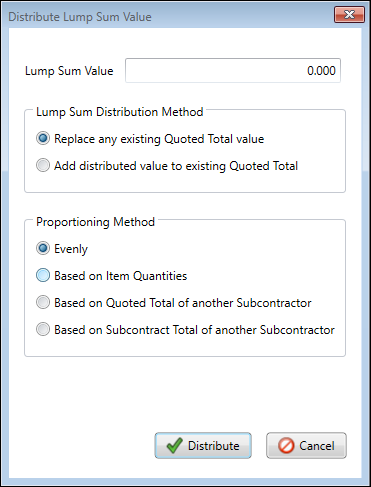
Distribute Lump Sum Value window
LUMP SUM DISTRIBUTION METHODS
The Lump Sum Distribution methods dictate how the application will be affecting the current Quoted values of the selected items.
|
FUNCTION |
DESCRIPTION |
|---|---|
|
Replace any existing Quoted Total Value |
When this option is selected, the lump sum value being distributed will replace the current Quoted Total for all selected lines. |
|
Add distributed value to existing Quoted Total |
The lump sum value being distributed will be added to the current value of the Quoted Total on an on an item by item basis. |
PROPORTIONING METHODS
The proportioning methods allow the user to select the factor on which to base the distribution of the Lump Sum Value.
Once a Lump Sum Value has been entered, and the distribution and proportioning methods selected, pressing the Distribute button will apply the value in the specified manner.
|
FUNCTION |
DESCRIPTION |
|---|---|
|
Evenly |
The specified Lump Sum Value will be divided by the number of items currently selected. |
|
Based on Item Quantities |
The specified Lump Sum Value will be divided by the total quantity of all items and multiplied by the item's quantity at the time of distribution. |
|
Based on Quoted Total of another Subcontractor |
The specified Lump Sum Value will be proportioned based the weighting each of the selected items, based on the Quoted Total of the specified Subcontractor. |
|
Based on Subcontract Total of another Subcontractor |
The specified Lump Sum Value will be proportioned based the weighting each of the selected items, based on the Subcontractor Total of the specified Subcontractor. |