Project Summary – Item Margin
Genesis edition only.
From within the Project Summary window, you have the ability to apply a margin percentage to individual Direct or Overhead Cost Schedule items as well as defining how this margin should be spread.
Before any changes can be made to the Project Summary, the Edit ( ) button needs to be selected from the ribbon toolbar.

Project Summary - Item Margin icon
GENERATING ITEM MARGIN
There are two types of margin that can be generated from the Item Margin window.
|
MARGIN TYPE |
DESCRIPTION |
|---|---|
|
Extra Margin |
The margin that is generated for the Cost Schedule item is in addition to the margin already calculated in the Project Summary. |
|
Override Margin |
Any percentages specified on the Project Summary will be ignored for the Cost Schedule item, and the margin will only be generated based on the value entered in the Item Margin window. |
When generating margin from the Item Margin window you can specify how you would like to apply the margin. Selecting Project in the Applies To field will proportionally distribute the margin generated over all items within the project, as per the normal spread routine. If Item is selected in the Applies To field, the amount of margin will be spread directly to the item generating the margin.
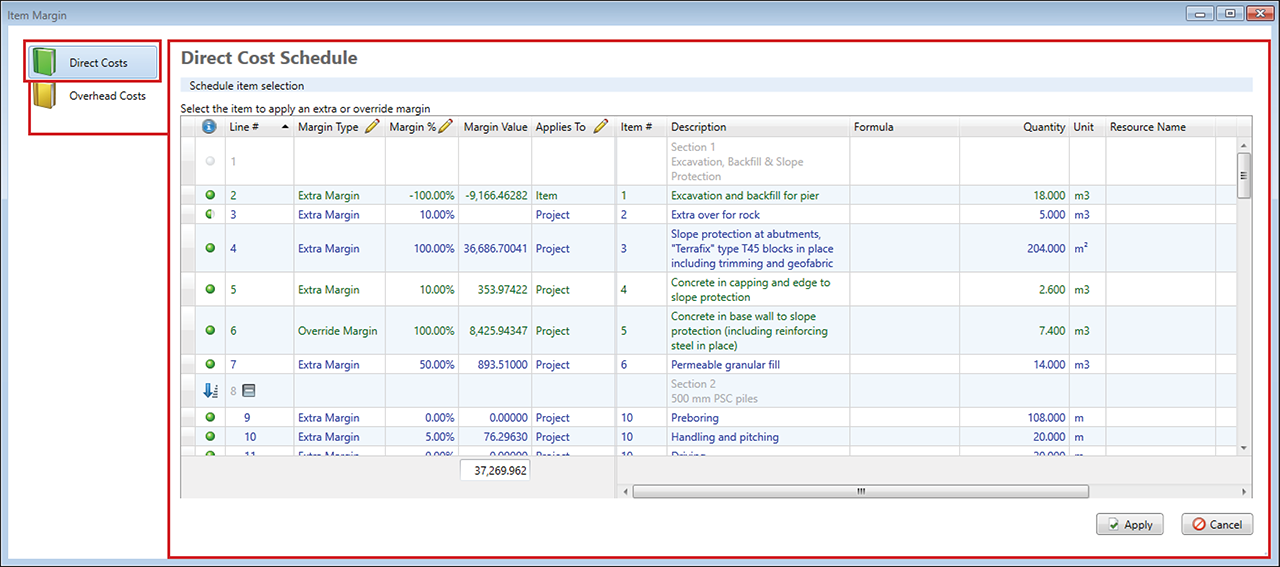
Item Margin window
Any margin generated from the Item Margin window will be displayed in the Margin Calculations section of the Project Summary window.