Cash Flow Scenario Options – Income
Genesis edition only.
The Income section of the Cash Flow Scenario Options window is used to specify the delay between when a progress claim is submitted and when the payment occurs. By default progress claims occur on the last day of each month.
To change the information in this section, click the Edit ( ) button in the Cash Flow Scenario Options ribbon toolbar.
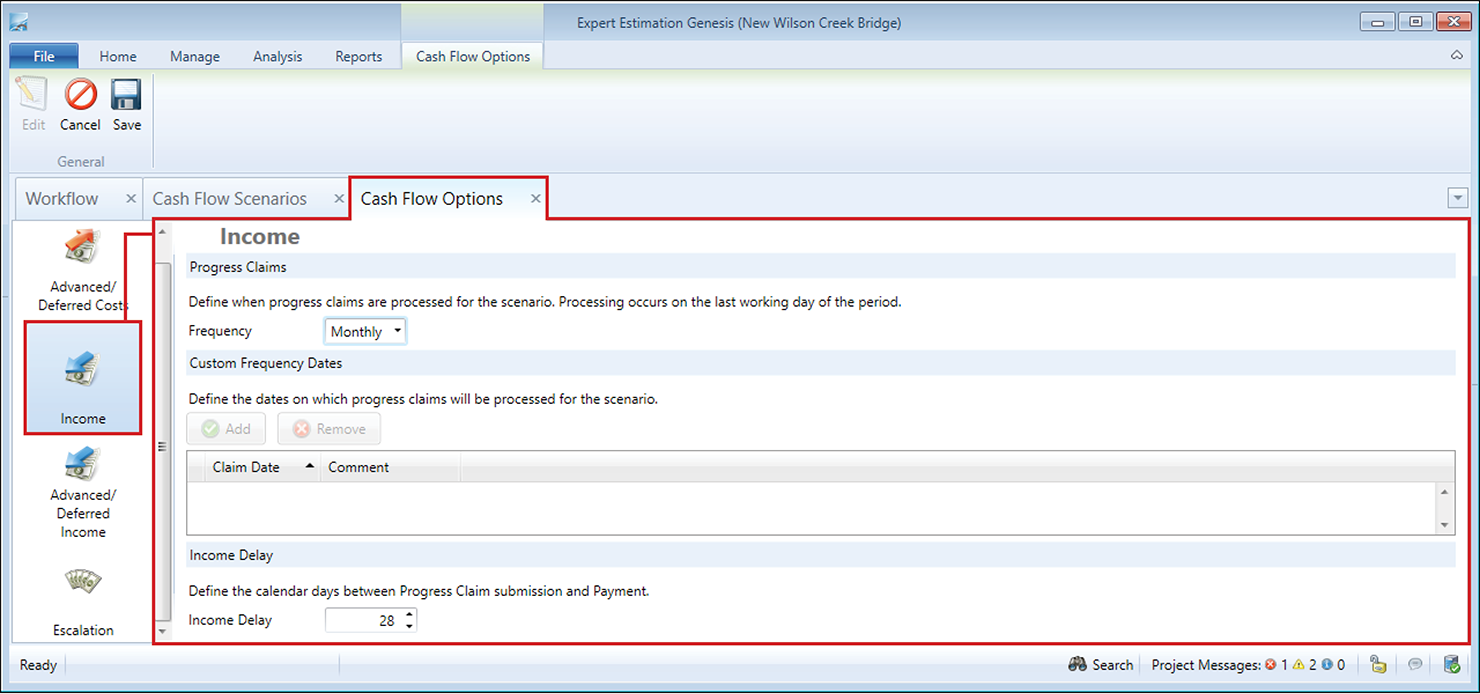
Cash Flow Scenario Options window – Income section
PROGRESS CLAIMS
The Progress Claim options set the frequency of when progress claims will be made during the project. The frequency can be to either Weekly, Monthly, Quarterly, Biannually, Annually or Custom.
CUSTOM FREQUENCY DATES
This option is only available if the Progress Claim Frequency is set to Custom. The Custom Frequency Dates provides you with the ability to define when in your Cash Flow Scenario the income is processed. Custom claim dates are added by clicking the Add Button in the Custom Frequency Dates section of the Cash Flow Scenario Options – Income window.
Note: There is no limit to the amount of custom progress claim dates a scenario can have, however, only one record can exist per calendar date.
INCOME DELAYS
This section in the Cash Flow Scenario Options – Income window allows you to define the duration between when a progress claim is made and when it is actually paid.