Cash Flow Results – Ribbon Toolbar
Genesis edition only.
The contextual ribbon toolbar for the Cash Flow Results window provides access to the analysis functions of the selected Cash Flow.
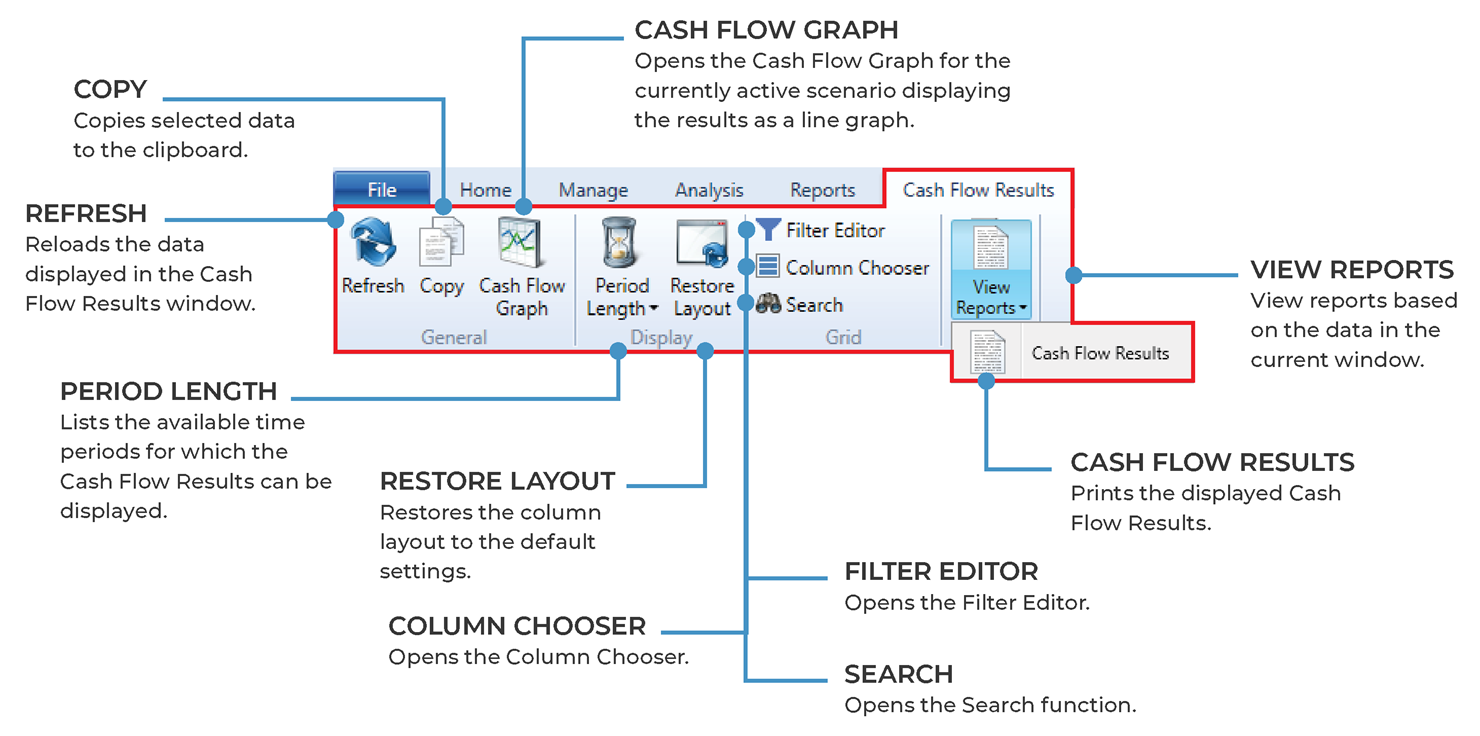
Cash Flow Results – ribbon toolbar
GENERAL GROUP
|
NAME |
DESCRIPTION |
|---|---|
|
Refresh |
Clicking the Refresh button reloads the data in the window. |
|
Copy |
Clicking the Copy button will copy the selected Cash Flow Results information to the clipboard. This allows for the data to be pasted to an external application. |
|
Cash Flow Graph |
Opens the Cash Flow Graph window, allowing for graphing and analysis of the Cash Flow results. |
DISPLAY GROUP
|
NAME |
DESCRIPTION |
|---|---|
|
Period Length |
The Period Length button allows the time period to be defined for the display of the Cash Flow Results. These time periods include Days, Weeks, Fortnights, Months, Quarter Years, Half Years and Years. |
|
Default Layout |
If columns have been removed, adjusted or relocated, clicking the Default Layout button will restore columns to their default layout. |
|
Save Layout |
Save the current layout with a unique name. This layout will be saved in the layout drop down as an option to be applied. |
|
Manage Layout |
Clicking the Manage Layout button opens a dialogue box that allows the user to export the selected layouts, import the previously exported layouts, rename any existing saved layouts or remove any non-required layouts. |
GRID GROUP
|
NAME |
DESCRIPTION |
|---|---|
|
Filter Editor |
Opens the Filter Editor to allow users to modify the contents of the grid so that only items that match the specific criteria set will be displayed. |
|
Column Chooser |
Clicking the Column Chooser button will open a dialogue box that will allow users to add or remove columns from the grid. |
|
Search |
Clicking the Search function will display a field in the top right-hand corner of the grid, that will allow users to search the current window for the text entered. |
REPORTS GROUP
|
NAME |
DESCRIPTION |
|---|---|
|
Cash Flow Results |
Prints the displayed Cash Flow Results. |